
DeSpot
Spotlight, dethroned.
macOS 14+ · Apple Silicon + Intel · 1MB · no account, no telemetry
The real thing, running
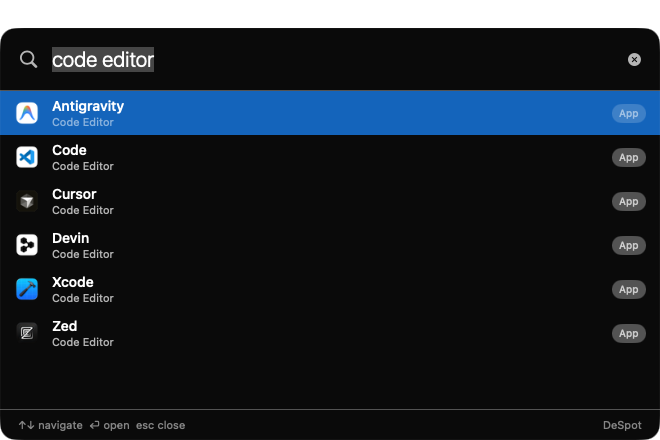
code editor — every installed editor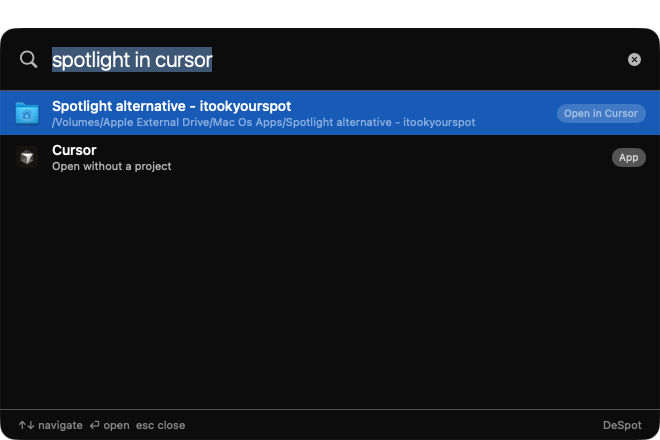
spotlight in cursor — project → editorType what you mean.
Get what you have.
Apps by purpose
Type browser, code editor, terminal, pdf reader — DeSpot lists every installed app that does the job, not just the one it remembers.
Projects, not just apps
frontend in cursor finds your repo and opens it straight in Cursor. One keystroke, zero file-manager spelunking.
Your AI, your key
Prefix ai to ask anything. Bring your own OpenAI-compatible endpoint — OpenRouter, Ollama, LM Studio, Groq. Keys stay in Keychain.
Fast and private
All matching is local. ~1MB binary, under 100MB RAM, no account, no analytics, no phone-home. Press ⌥Space, it's just there.
Try these
code editorevery editor you own, rankedweb in zedopens your web project in Zedbrowserevery installed browserterminalTerminal, iTerm, Warp, Ghostty, Kittyai explain this regexstreams an answer from your endpointInstall
1. Download DeSpot.zip and unzip
2. Move DeSpot.app to /Applications
3. First launch: right-click → Open (notarized build coming)
4. Press ⌥ Space — that's the whole tutorial
Optional: ◇ menu bar → Settings to set your AI endpoint, hotkey, and project folders.